1. Help
Contact us for app support or technical questions (info@SensiplanApp.eu).
Contact Sensiplan counsellors for individual guidance (www.sensiplan.de/beraterinnen).
2 PRODUCT NAME AND GENERAL DESCRIPTION
2.1 Product:
Sensiplan+, Android model and iOS model
2.2 Description:
Sensiplan+ is designed to raise awareness among girls and women about the monthly female cycle and fertility during the fertile years, from menarche to menopause.
2.3 Identification:
Basic UDI-DI: 383008791SWFERT271203Y5
EMDN code: V92
2.4 Manufacturer
Wonderlife d.o.o., Kamnik pod Krimm 68F, SI-1352 Preserje, SRN: SI-MF-000046819
2.5 Contact:
Email: info@SensiplanApp.eu
2.6 About Sensiplan+
Sensiplan+ is not just a mobile application for entering and storing information related to cycles. Depending on your age and chosen goal, the app offers different ways and functions to support cycle tracking and, where possible, determine your fertile period.
Sensiplan+ covers the operation of the application in three modes: Sensiplan+ Girl, Sensiplan+ Teen and Sensiplan+ Woman. Each mode is designed for a specific age group and specific goals. Two modes, Sensiplan+ Girl and Sensiplan+ Teen, are only intended to record daily well-being and changes in the body associated with the female cycle. In these two modes, the application does not value or calculate, so it does not fall into the category of a medical device.
The Sensiplan+ Woman mode (with evaluation) is considered a medical device because it allows you to evaluate the cycle and determine the fertile period.
Please read the options below carefully to make sure you have chosen the correct mode for your age and goal and that you are using the correct instructions for use (IFU).
Sensiplan+ modes:
1. Sensiplan+ GIRL (age up to 17) This mode is intended for girls who have already had their first menstrual period. It can be used as:
1.a Cycle diary (read IFU for girls) - non-medical device: records bleeding days, daily mood and well-being, relationships, and other notes. This helps girls get used to self-observation.
1.b Tracking cycles without assessment (read IFU for teenagers) - non-medical device: for users who want to practice observing and recording fertility signs using the Sensiplan method. The application supports data entry, self-evaluation and creation of a Sensiplan table.
2. Sensiplan+ TEEN (ages 18-20) Teen mode is designed for users aged 18-20 and offers the following purposes:
2.a Tracking cycles without evaluation (read IFU for teenager) - non-medical device: to learn self-observation and record signs of fertility according to Sensiplan. The application supports data entry, self-evaluation and creation of a Sensiplan table.
2.b Cycle tracking with evaluation (read IFU for woman) (payable after 3 trial cycles): allows the entry of fertility signs and performs cycle assessment according to Sensiplan rules. With the results shown in the Sensiplan table. It also includes self-evaluation and a separate table that shows the user's self-evaluation.
2.c Plan pregnancy (read IFU for woman) (payable after 3 trial cycles): for users who want to become pregnant and use Sensiplan+ self-observation and evaluation to determine the fertile window. It also includes self-evaluation and a separate table that shows the user's self-evaluation.
3. Sensiplan+ WOMAN (age 21+) The mode for women is intended for users aged 21 years and over and offers the following goals:
3.a cycle tracking with evaluation (read IFU for woman) (paid after 3 trial cycles): allows the entry of fertility signs and evaluates the cycle according to Sensiplan rules, and the results are shown in the Sensiplan table/table. It also includes a self-score and a separate table/table that shows the user's own rating.
3.b Plan pregnancy (read IFU for woman) (paid after 3 trial cycles): for users who want to become pregnant and use self-observation and Sensiplan+ assessment to determine the fertile window. It also includes a self-evaluation and a separate table/table that shows the user's own rating.
Depending on your age and goal, please use the relevant User Guide (IFU):
- IFU for Girls (Cycle Diary) - non-medical device
- IFU for Teenager (Cycle Tracking Without Evaluation) - non-medical device
- IFU for Woman (cycle monitoring with evaluation or pregnancy planning)
Sensiplan+ Girl
2.7 Intended Use: Cycle diary
The Sensiplan+ Girl mode is intended for girls who have already had their first period and want to use the Cycle Diary to record bleeding days, daily mood and well-being, relationships, and other notes. This helps them develop the habit of self-observation.
"Sensiplan+ Girl" is not suitable for teenagers or women who only want to enter basic information and expect the app to accurately observe fertility signs for them.
2.8 Limitation of liability
Sensiplan+ is designed to record user cycle observations. The ratings suggested by the app are based on the information you provide and are for recommendations only. A reliable and safe interpretation of your observations is only possible if you know the rules of the Sensiplan method. The final review and evaluation of the results always remain with you as a user – the app cannot and should not replace your personal decision-making process. Information on safe learning and the use of the Sensiplan method can be found here: www.sensiplan.de.
The App is not a substitute for medical diagnosis or treatment and is not intended for self-diagnosis or self-medication.
The app is not suitable for users for whom pregnancy would pose a health risk.
The app and the underlying algorithm are not intended for contraception.
2.9 Residual risk and contraindications
Sensiplan+ is not intended for use during pregnancy or while taking medicines that induce pregnancy (e.g. certain birth control pills).
Sensiplan+ is not suitable for monitoring physical signs in girls before their first menstrual period or in women who are no longer of childbearing potential.
Sensiplan+ is not a substitute for contraception and does not prevent pregnancy.
Sensiplan+ is designed for daily observation and intake of signs of fertility, including basal body temperature (BBT). The BBT must be measured with a thermometer with an accuracy of ± 0,05 °C and the temperature should be readable to two decimal places.
It is recommended that you learn the Sensiplan method, but you can also use the application without knowing the Sensiplan method. Sensiplan+ is not a substitute for appropriate Sensiplan training or personal counseling in special situations, such as: unusually short or long cycles (<16 / >56 days), missed periods, postpartum or lactation cycles, other cycle abnormalities, shift work.
In case of problems with the use of the application, advice or interpretation of your reports, you can contact the manufacturer (info@SensiplanApp.eu) or certified Sensiplan consultants, which are published here: www.sensiplan.de/beraterinnen.
2.10 In the event of a serious incident
Any serious incident that has occurred in relation to the device must be reported to the manufacturer and to the competent authority of the Member State in which the user and/or patient is registered.
2.11 Description of functionality of other modes, such as Sensiplan+ Teen and Sensiplan+ Woman
Sensiplan+ works on the basis of a daily intake of physical signs and sensations associated with a woman's menstrual cycle. The application allows you to enter general data and specific information, including measurements and values of basal body temperature, feeling/appearance/type of uterine mucus, position and texture of the cervix, and other factors that may affect these signs (such as lack of sleep, alcohol consumption, late night activities, stress, etc.).
Based on the daily data, the app creates a cycle analysis. Users can export the graph in a tabular format that is understandable to consultants and gynaecologists trained to evaluate data according to the Sensiplan method.
A detailed explanation of the functionality of Sensiplan+ Girl is given below.
2.12 Required environment:
Sensiplan+ works on mobile devices, smartphones with Android 7+ (or later) or iOS version 15+ (or later). It is intended for personal use in the home environment. It is installed on the user's mobile device and works as a mobile application.
For optimal performance, it is necessary to update the operating system when upgrades are available, and update Sensiplan+ accordingly if necessary.
Sensiplan+ also works offline, even when the device is not connected to the network or is in airplane mode. However, in this case, certain features will not be available, such as:
- A user can't share data, reports, or tables from their device.
- You can't back up your data.
- Web links will not be accessible.
- The user cannot send messages to the Sensiplan+ support team.
Sensiplan+ works on a mobile device if:
- the device has a compatible and updated iOS or Android operating system.
- The device works according to the manufacturer's guidelines, which means that it has a working touch screen, sufficient battery and enough space to store data.
2.13 Used symbols
Symbol | Opis | Opombe |
 | UDI | Unique Device Identification |
 | Refer to instructions for use | Instructions for use are supplied with the product |
 | Manufacturer | Wonderlife d.o.o., Kamnik pod Krimom 68F, 1352 Preserje SRN: SI-MF-000046819 |
 | CE conformity marking | The marked product complies with the EU Medical Devices Regulation (MDR) |
 | Medical device | The marked product is a medical device |
3 How to get started with Sensiplan+
3.1 Download Sensiplan+
- from Google Play (for Android devices) or App Store (for iOS devices)
- Open Google Play or the App Store:
- Find and click the Google Play Store (or App Store) icon on your device.
- Find an app:
- In the search bar, enter the name of the Sensiplan+ application, then press the icon Search (magnifying glass) - Android or press "Search" - iOS.
- Choose an app:
- In the search results, look for the Sensiplan+ icon and tap it to open the app's details page.

- Install the app:
- On the app's details page, tap the Install button (Androids) or the Get button (iOS).
Direct links (tap on the icon):
- Verify all permissions that the application requests, if it requests it.
- For iOS devices, confirm with "Install" and sign in with their Apple ID if requested.
- Wait for download and installation:
- You'll start downloading and installing Sensiplan+. Once the process is complete, the app icon will appear on the home screen – this confirms that the installation was successful.

3.2 Getting started with Sensiplan+
When the app is installed and you launch it for the first time, you'll see a Start screen with a language button. You can choose between English, German or Slovenian. After selecting a language, tap Get Started to start the preparation process.


All the data you enter into the app is initially stored only on your mobile device. All data collected by the application on external servers is completely anonymized and is used exclusively for monitoring the performance of the applications, checking the correct functionality, detecting problems and planning improvements.
Initially, enter your name or nickname – whatever you want the app to address you – and then select the month and year of your birth. Please enter your real age, as the app provides certain features based on this information.

During the initial process, use the Next button at the bottom of the screen. To return to the previous screen, tap the back arrow in the upper-left corner.
Go through the onboarding screens and choose the goal you want to achieve with Sensiplan+. Based on your age (under 18), the app will offer two options: Cycle Diary or Track cycles without evaluation. If you choose Track cycles without evaluation, stop reading these instructions and refer to the Instructions for Teens.
Continue reading these instructions only if you choose My Cycle Diary.
On the next screens, read more about the Sensiplan method.


Please read the warnings and usage restrictions carefully.


On the following screens, enter information about your last cycles. It's okay if you don't know all the answers—you can skip some questions or leave the fields blank.

At the end of the preparation, read the instructions, the Terms of Use and the Privacy Policy. Only if you agree with everything listed do you confirm your consent and click Next. Here are links to the Terms of Use and Privacy Policy: ,

After confirming and agreeing to use Sensiplan+, you can decide whether you want to receive reminders (notifications) from the app. You can also turn reminders on or off later on the MORE screen → Settings.

4 Main screens and functionalities of Sensiplan+
4.1 Today's Display
Congratulations! — Once the initial setup is complete, the app will open on the main 'Today' screen. This screen appears every time you open the app Serves as a starting point for data entry and review.

4.2 Calendar
Here's your cycle shown day by day, red dots indicate bleeding. You can switch to a monthly or yearly view. Tap any day to see that day's entries. To change the data, tap Edit to open the Edit Cycle screen, where you can enter the data of the day.


4.3 Edit cycle
Edit Cycle is used to record which days you had bleeding, along with many other details you can track. This way, you can see how your well-being, activity, and nutrition change throughout your cycle—along with factors like the weather and more.
After entering, press "DONE" in the upper right corner to save the data. To make it easier to switch between days, you can use the signposts to the left and right of the date.

4.4 Analysis
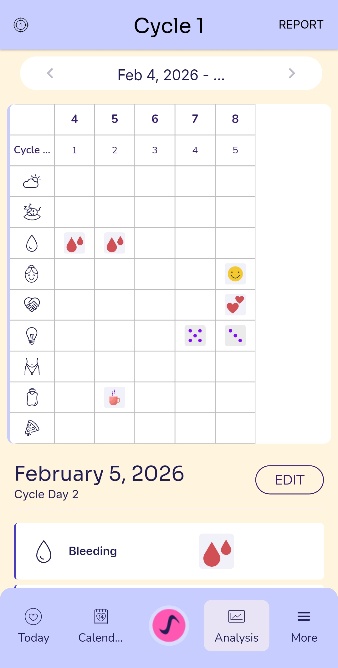
The Analysis screen shows an overview of your entries. Here, you can also tap Edit to enter or update data. Swipe left to view previous cycles, and swipe right to move forward through cycles.
4.5 More
The More screen brings together your settings, support options, and app information in one place. At the top, you can see your current MODE (for example, Girl). Once you turn 18, you will be able to select Teen mode.
In the Data section:
The summary gives you a quick overview of the recorded cycle data.
Backup & Restore allows you to back up your data and restore it when needed.
Health Notes is a place where you can store health notes related to your physical signs.
In the Settings section:
Profile to view or update your information.
Settings includes options such as language, reminders/notifications, and other app settings.
The general section includes
Contact us for application assistance or technical questions (link to info@SensiplanApp.eu).
Contact Sensiplan consultants who can help you find support from Sensiplan consultants if you want individual guidance (Link to https://www.sensiplan.de/beraterinnen).
The Terms of Use contain the rules and legal conditions for the use of Sensiplan+.
The Privacy Policy explains how your data is treated and protected.
The Help and User Manual opens the Sensiplan+ user manual.
About provides key information about Sensiplan+, such as version details and general references.


Date: 30.1.2026